1. Home
  2. Industries
  3. Landscaping

Landscaping crews route days · seasonal crews · hours per property

Landscaping time tracking for crews on the move

A lawn care crew can hit six or eight properties before lunch, and the timesheet usually says "Tuesday, 9 hours". GEOTT gives each property its own geofence, checks the crew in on arrival, splits the day by property, and charges nothing in the months your crews are off.

$7 per active worker a month · $0 in months nobody works · 15-day trial, no card

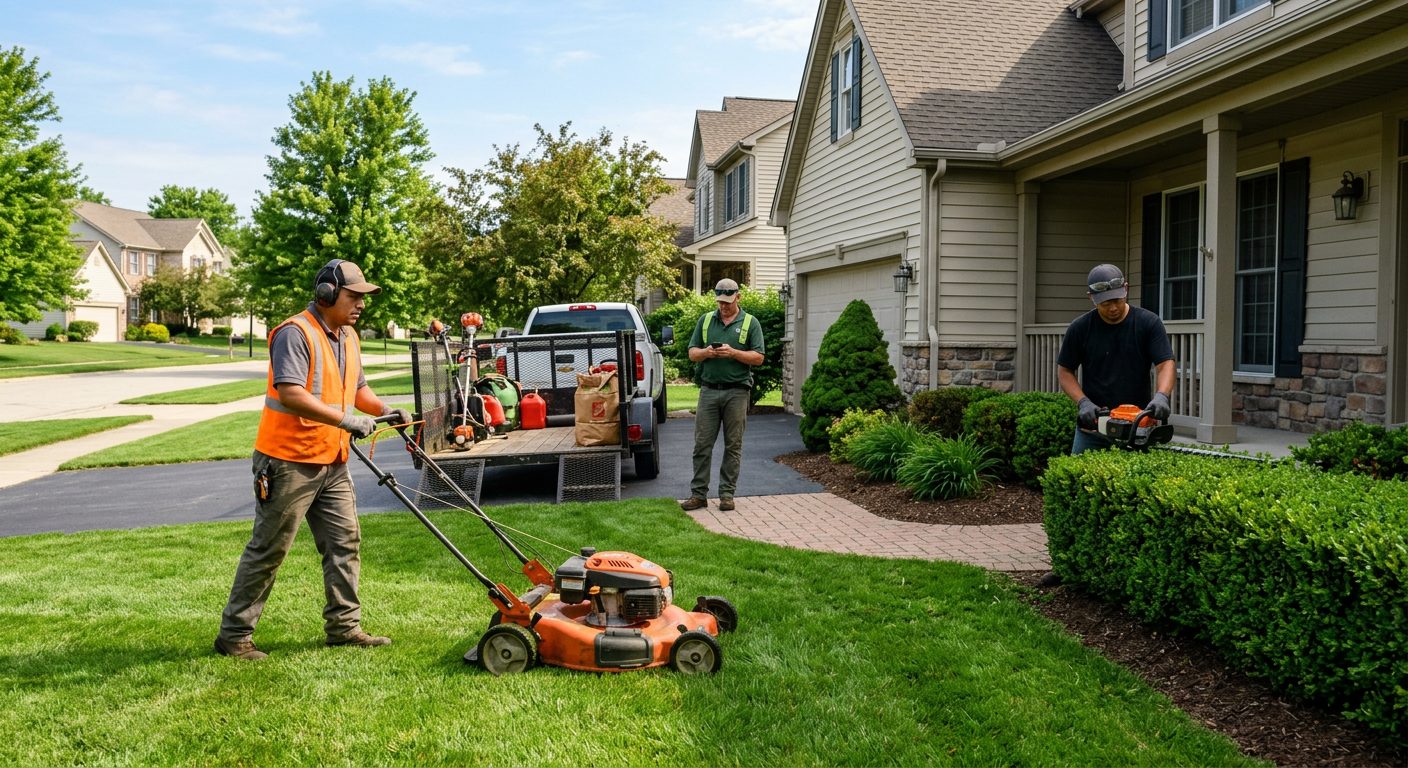
Landscaping crew working on a suburban lawn in the morning
One stop on the route: the crew checks in on arrival, inside that property's circle.

Why don't paper timesheets work for landscaping crews?

Because a landscaping day isn't one job, it's a route. Paper and group texts give you the start and end of the day, not the 25 minutes at one property and the two hours at another. Without hours per property you can't tell which contracts lose money, and long lunch stops between yards stay invisible.

Common gaps on a route day, and how GEOTT closes them
What happens todayWhat GEOTT does
The foreman writes the whole crew's hours on Friday from memoryEach worker clocks in on the phone; the office sees punches the same day
Nobody knows how long the HOA common areas really takeHours split by property at clock-out, or with a site change at each stop
A crew "starts" at the shop but rolls out 40 minutes laterThe clock-in counts only inside the geofence of the first property, if you want it that way
Rural properties with one bar of signalThe punch is saved on the phone and uploads when coverage returns
Seasonal hires every springAn invite link by text; the season's workers are billed only in months they clock in

How do landscapers set up GEOTT for a route?

Add the properties you service every week as sites, each with a circle around the lot. Crews clock in at the first stop and switch site at each next stop, or split the day at clock-out if they prefer one tap. Setup takes about 2 minutes for the first property; the rest is a list of addresses.

  1. List the properties

    Each recurring account becomes a site. Rename "Project" to "Job" or "Site" if your crews say it that way.

  2. Group the crews

    Put workers in crews to assign properties, send reminders to one crew and filter the reports.

  3. Check in at each stop

    A site change on arrival is one tap and is checked against the next property's circle.

  4. Breaks with one tap

    Turn on break tracking and lunch is recorded as a break, not guessed afterwards.

  5. Overtime in peak season

    Hours over 40 in the workweek are counted as overtime, with optional daily thresholds.

  6. Hours per account

    The by-project export shows the hours each property took this month, the basis for next year's price.

What does a route day look like in GEOTT?

Below is a sample day with invented properties for a crew of three. Five stops, one with weak signal, one long lunch recorded as a break. At the end of the day GEOTT shows 24 worked hours for the crew, split across five accounts, instead of a single number on a Friday sheet.

Sample data: crew of three, five properties
TimeProperty (sample)Crew hoursNote
7:00 a.m.Office park, mowing and edging4.53 valid clock-ins at the gate
8:30 a.m.Two homes on the same street3.0Site changes on arrival
9:30 a.m.HOA common areas7.5Weak signal: saved, synced at 11:40
12:00 p.m.Lunch—Break, 30 minutes
12:30 p.m.Church grounds, planting9.0Clock-out at 3:30 p.m.

Entries saved without signal keep their original time. On an iPhone they upload the next time the worker opens GEOTT with signal. More on offline clock-in.

What radius fits a residential lawn or a big estate?

Outdoors, GPS works well: phones are typically accurate to about 4.9 m (16 ft) under open sky, per GPS.gov. Trees and nearby buildings make it worse. So a home lot needs a smaller circle than a park, and tall tree cover deserves some extra room.

GEOTT suggests a radius by type of site and tells you after the first week if honest punches land just outside. Details on geofence time tracking.

Starting points, to adjust after a week
PropertySuggested radius
Single-family home50 m (about 165 ft)
Commercial building with lawns100 m (about 330 ft)
HOA common areas300 m (about 985 ft)
Park, campus or estate500 m (about 1,640 ft)

How much does GEOTT cost for a seasonal landscaping business?

$7 per worker who clocked in that month, and nothing in months without clock-ins. A company with 12 workers from April to October and 2 in winter pays $84 in a summer month and $14 in a winter month. There is no annual plan, no base fee and no charge per property.

Sample year: 12 workers in season, 2 in winter
MonthsActive workersMonthly bill
April to October12$84
November and March5$35
December to February2$14

Admins and office staff who don't clock in are free. How the count works: GEOTT pricing.

Landscaping questions

What is the best time tracking app for landscaping crews?

One that records time per property, not just per day, works on rural routes with weak signal and costs nothing in the off-season. GEOTT does those three, opens from a link without an app store, and can be tested with one crew for 15 days without a credit card.

Can the crew clock in once at the shop?

Yes, if you add the shop as a site. Many landscapers prefer the first property as the starting point, so drive time isn't counted as time at a client. You decide per company, and you can let a worker clock in anyway outside the circle, with a flag for you to review.

Does GEOTT track the truck while driving?

No. GEOTT is not a vehicle tracker: it reads the phone's position only at clock-in, site change and clock-out. What happens between stops isn't recorded. That keeps the app acceptable to crews who use their own phones.

Can I see which accounts lose money?

GEOTT gives you the hours. The by-project export lists the crew hours each property took in the month; put them next to what the contract pays and the unprofitable stops stand out. GEOTT doesn't do invoicing or payroll.

Which other crews use GEOTT?

Any company whose people start the day on a job site instead of in an office. Each page takes one trade, its typical day and the radius that fits its sites.

How do I try GEOTT on one landscaping crew?

Add the properties on one crew's route, send the link and let them clock in for a week. You will see hours per property on day one. The trial lasts 15 days, needs no credit card and doesn't bill anything when it ends.